What is Traveloot?
Traveloot is a run-based incremental game about exploring islands, building a team of adventurers and buying upgrades between runs. It is made by the solo studio Fluffy Lotus in Unity, drawn in pixel art, and an early version of it runs free in your browser right here. Each run, your little party marches across an island on its own while you steer the action with the cursor: point at enemies, pick up resources, and keep everyone alive until the HP bar runs dry. Then you spend what you carried home, unlock new skills, and set out again a little stronger.
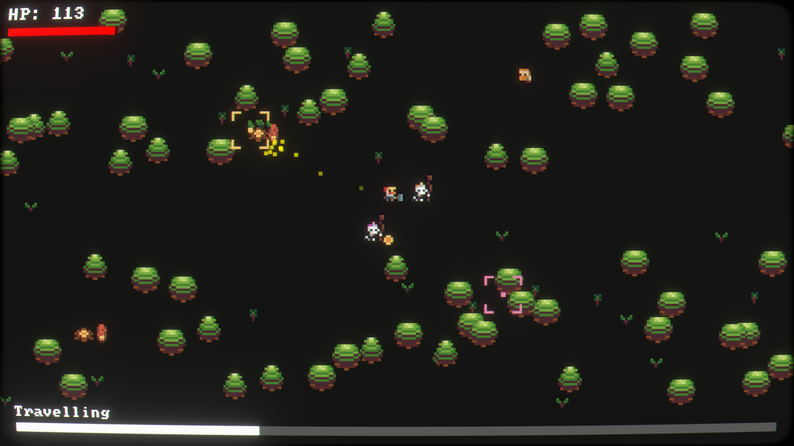
The loop is short and easy to start. One Traveloot run lasts a few minutes, so it fits into a coffee break, but the upgrade tree and the roster of recruits give you a reason to come back for the next run. It is part idle game, part light action game, and part team builder.
How to play Traveloot
Press Play Traveloot above, wait for the islands to load, and start your first journey from the main menu. The goal of every run in Traveloot is simple: travel as far as you can, defeat enemies and gather loot before your team's health runs out.
Traveloot controls
| Input | What it does |
|---|---|
| Left click | Click: interact, attack and pick up |
| Right click | Drag |
| WASD | Drag |
| Esc | Open the menu |
| Xbox controller | Full gamepad play, including a second player in co-op |
Traveloot is listed as a mouse game. The party moves along the route automatically, so your job is to aim the cursor at whatever matters most right now: the enemy hitting your team, the resource node you need for the next upgrade, or the loot dropping on the ground.
Between runs: Map, Upgrade and Guild
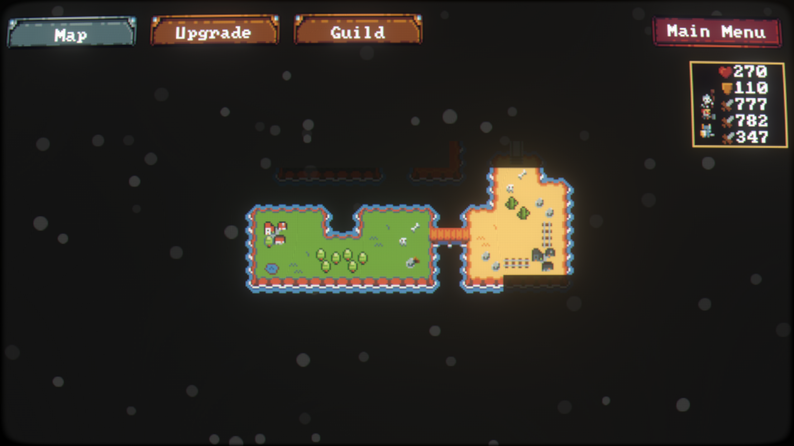
When a run ends you land in the hub, which has three tabs along the top.
- Map shows the islands you can travel to. Each island has its own biome, enemies and resources.
- Upgrade is the branching upgrade tree. Spend the resources you gathered to unlock abilities, make your team members tougher and improve their skills.
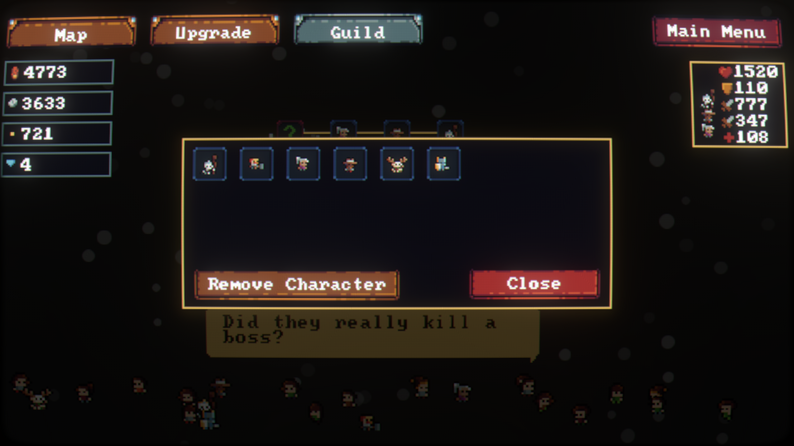
- Guild is where you recruit adventurers and choose who comes along on the next run. Every adventurer has their own ability, so the team you pick changes how the run plays.
Traveloot tips for your first runs
These tips stick to how the game is built; they are not secret strategies.
- Spend every run's loot. Traveloot is incremental: progress comes from the upgrade tree, not from one perfect run. If a run feels too hard, go back to the hub, buy upgrades and try again.
- Use a real mouse if you can. Gathering means a lot of quick pointing and clicking, which is noticeably easier with a mouse than with a laptop touchpad.
- Try different recruits. Swap adventurers in the Guild when you get stuck. A different mix of abilities can carry you further than another round of the same team.
- Keep your browser data. Your progress in the browser version is stored by your browser. Clearing site data or playing in a private window starts you from zero.
- Go fullscreen. The pixel art is small; the fullscreen button under the game makes enemies and resources much easier to hit.
Traveloot co-op: play with a friend
Traveloot is built for one or two players. In local co-op a friend joins on the same computer with an Xbox controller, and the two of you gather resources, fight enemies and work through the upgrades together. Co-op is local only: you share one screen, and on Steam you can also use Remote Play Together. The early browser build on this page is mainly a solo experience; for co-op, the Steam version is the one to pick.
Traveloot in the browser vs Traveloot on Steam
The version you play on this page is an early, free browser build of Traveloot (version 0.03) hosted on Armor Games. It covers the first islands of the journey and is the easiest way to try Traveloot without installing anything. Because it is an early build, some features and balance changes from the finished game are missing, and the first load downloads a fairly large file, so give it a minute on a slow connection.
The full version of Traveloot launched on Steam on November 17, 2026 for Windows. The Steam store page lists four islands, eight recruitable adventurers, a branching upgrade tree, local couch co-op with Remote Play Together, controller support, achievements and cloud saves. There is also a free Traveloot demo on Steam. If you enjoy the browser runs and want the whole journey, buying the Steam version is also the best way to support the developer.
Is Traveloot worth playing?
If you like incremental games where every short run feeds a bigger upgrade tree, Traveloot is an easy yes: it is free here, it needs no install, and the loop of travel, loot and upgrade is clear from the first run. Players on itch.io rate it 4.5 out of 5, and its first Steam reviews are positive. It is a small game rather than a huge one, and players on the Steam forums say a full playthrough of the Steam version takes roughly four hours.
Traveloot is created by Fluffy Lotus. This page embeds the early browser version hosted on Armor Games and is not affiliated with the developer. Find the game on itch.io and on Steam.